

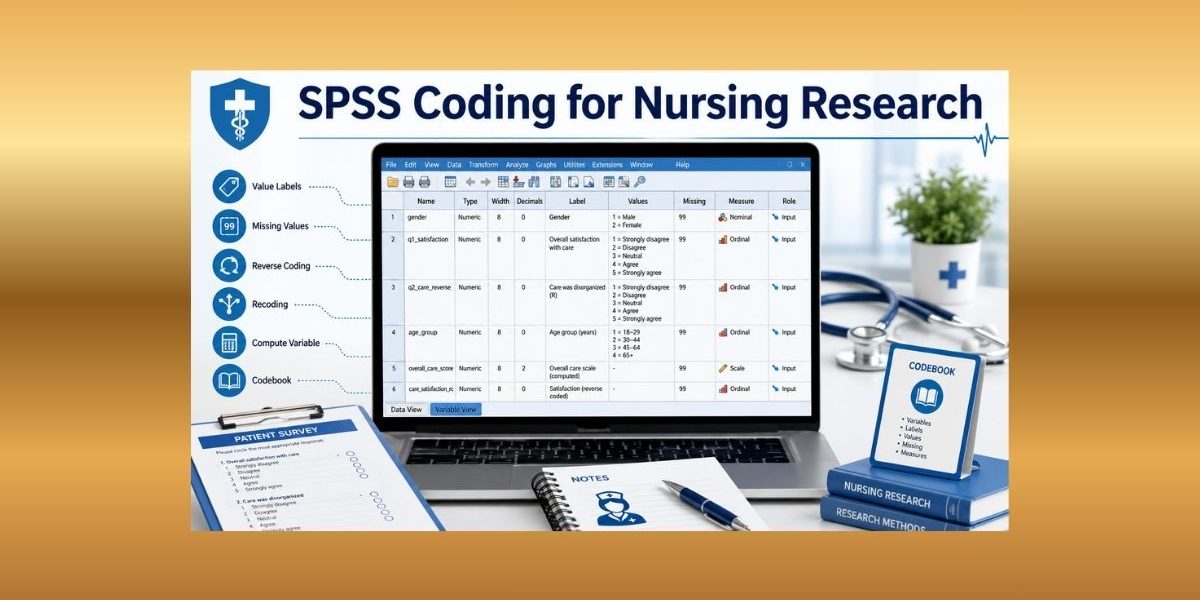
Introduction
Many nursing students enter or import data into SPSS, then realize the variables are not ready for analysis. Questionnaire responses may appear as text instead of numeric codes. Categories may lack value labels. Missing responses may be mixed with real values. Likert-scale items may point in different directions. Some variables may also need reverse coding, recoding, dummy coding, or computed scale scores before analysis.
SPSS coding converts raw responses into meaningful, consistent, analysis-ready variables. Correct coding helps SPSS recognize categories, missing values, reverse-worded items, scale scores, and grouped variables. It also protects the accuracy of descriptive statistics, reliability checks, regression models, ANOVA outputs, and APA reporting.
This article is different from SPSS Data Entry because it focuses on coding decisions after or during dataset setup.
Need help turning raw SPSS variables into analysis-ready data? Our SPSS Data Analysis Help service can help you code responses, fix missing-value rules, reverse-code items, recode variables, and compute scale scores for your nursing research.
What Is SPSS Coding?
SPSS coding means assigning numeric values, labels, and rules to research responses so SPSS can analyze them correctly.
In nursing research, SPSS coding may involve:
- Assigning numeric codes to categories
- Adding SPSS value labels
- Defining SPSS missing values
- Coding Likert-scale responses
- Reverse-coding negatively worded items
- Recoding variables into new categories
- Computing total, mean, subscale, or change scores
IBM describes variable attributes as metadata that may include descriptive labels, value labels, missing-value categories, and measurement level (IBM, n.d.-a). These attributes help coded variables carry meaning beyond raw numbers.
SPSS Coding vs Data Entry vs Data Cleaning
SPSS data entry places raw data into SPSS, while SPSS coding gives responses numeric meaning and prepares variables for analysis. When it comes to SPSS data cleaning, it checks whether coded variables contain errors, out-of-range values, duplicates, missing-value problems, or inconsistencies.
For example, entering “Female” into a cell is data entry. Coding gender as 1 = Male, 2 = Female, and 3 = Prefer not to say is SPSS coding. Running frequencies to check whether gender contains an unexpected code such as 7 is data cleaning.
After coding, use Data Cleaning Steps in Nursing Research to verify coded variables before final analysis.
Why Correct SPSS Coding Matters in Nursing Research
Correct SPSS coding matters because coding errors can distort findings before analysis begins. If 99 is used for missing values but not defined as missing, SPSS may treat 99 as a real score. If a negatively worded satisfaction item is not reverse-coded, the total satisfaction score may be inaccurate.
Coding also improves interpretation. Value labels make output easier to read. Recoding helps align variables with research questions. Computed variables help create total scores, subscale scores, mean scores, and pretest-posttest change scores.
Nursing research depends on careful data collection, measurement, management, and interpretation because findings must be credible and useful for evidence-based practice (Gray et al., 2025). Good SPSS coding supports that credibility.
Create a Coding Plan Before Analysis
Before coding variables, create a simple plan. Do not code variables randomly.
Your coding plan should:
- Review the questionnaire or data collection tool
- Identify categorical, ordinal, and scale variables
- List variables that need numeric coding
- Decide value labels
- Choose missing-value codes
- Mark reverse-worded items
- Identify variables that need recoding
- Identify scales or subscales needing total or mean scores
- Match coding decisions to the research questions
- Follow the instrument scoring guide
NIH data-management guidance emphasizes planning how scientific data will be managed, documented, preserved, and shared (National Institutes of Health, 2026). For nursing students, that planning starts with a clear coding guide.
Coding Categorical Variables in SPSS
Categorical variables should use clear numeric codes and value labels.
Examples:
- Gender: 1 = Male, 2 = Female, 3 = Prefer not to say
- Education level: 1 = Diploma, 2 = Bachelor’s, 3 = Master’s, 4 = Doctorate
- Employment status: 1 = Employed, 2 = Unemployed, 3 = Student, 4 = Retired
- Diagnosis category: 1 = Hypertension, 2 = Diabetes, 3 = Asthma, 4 = Other
Categorical variables should also have the right measurement level. Gender and diagnosis category are nominal. Education level may be ordinal if the categories follow a meaningful order.
Avoid mixed text responses such as “female,” “F,” and “woman” in the same variable. Use one numeric coding system and document it in the codebook.
Coding Likert-Scale Data in SPSS
Likert scale coding in SPSS should follow the questionnaire scoring guide. Most Likert items use numeric codes such as 1 to 5 or 1 to 7.
Example:
1 = Strongly disagree
2 = Disagree
3 = Neutral
4 = Agree
5 = Strongly agree
Enter the number in SPSS and add the response meaning as a value label. Do not type “Strongly agree” into every cell.
Check whether higher scores should mean more of the construct. For example, higher scores may mean greater confidence, stronger adherence, higher satisfaction, or more burnout. If one item is negatively worded, it may need reverse coding before scale scores are computed.
Using Value Labels Without Changing Data Values
SPSS value labels describe numeric codes. They make output readable without changing the actual numeric value.
Example:
Variable: smoking_status
1 = Never smoked
2 = Former smoker
3 = Current smoker
The actual data remain 1, 2, and 3. The labels help SPSS output display the meaning of each code. IBM shows value labels as part of SPSS variable metadata, alongside labels, missing-value categories, and measurement levels (IBM, n.d.-a).
Value labels are useful for demographic variables, clinical categories, Likert responses, audit categories, and grouped variables.
Defining Missing-Value Codes in SPSS
Missing responses should not be analyzed as real values. A missing value may occur when a participant skips a survey question, a follow-up form is incomplete, a lab value is unavailable, or a participant withdraws.
Common missing-value codes include 99, 999, or -99. Use them only when they cannot be valid real values. For example, 99 may work for a 1–5 Likert item, but it may not work as a missing code for age if a 99-year-old participant is possible.
If you use a missing-value code, define it in SPSS and document it in the codebook. Never guess missing responses.
Reverse Coding in SPSS
Reverse coding is needed when some items are worded in the opposite direction from the rest of the scale. Items must point in the same direction before total, mean, or subscale scores are created.
For a 1–5 item, reverse coding usually works like this:
| Original value | Reversed value |
|---|---|
| 1 | 5 |
| 2 | 4 |
| 3 | 3 |
| 4 | 2 |
| 5 | 1 |
Example: A patient education satisfaction scale includes the item, “The discharge instructions were confusing.” If higher scores should mean higher satisfaction, this negative item must be reversed before computing the satisfaction score.
Create a new reversed variable instead of overwriting the original. For example, recode sat_q3 into sat_q3_r. Then document that sat_q3_r is the reverse-coded version of sat_q3.
Recoding Variables in SPSS
SPSS recoding changes existing values into new categories. It may be used to group ages, collapse rare categories, combine education levels, or create binary categories.
Examples:
- Age in years recoded into age groups
- Education recoded into lower vs higher education
- Satisfaction score recoded into low, moderate, and high satisfaction
- Adherence category recoded into adherent vs non-adherent
A simple recoding plan may look like this:
| Original variable | Old values | New variable | New values |
|---|---|---|---|
| age | 18–34, 35–49, 50+ | age_group | 1 = 18–34, 2 = 35–49, 3 = 50+ |
| education | 1, 2, 3, 4 | edu_binary | 0 = Below bachelor’s, 1 = Bachelor’s or higher |
| adherence_total | 0–20, 21–35, 36–40 | adherence_level | 1 = Low, 2 = Moderate, 3 = High |
IBM’s Recode into Different Variables option allows users to recode single values, ranges, and missing values into a new variable (IBM, n.d.-b). This is safer than overwriting the original variable because it preserves the raw data.
Dummy Coding in SPSS
Dummy coding converts a categorical predictor into 0/1 variables. It is mainly used when a planned model requires categorical predictors to be represented as binary indicators.
Example: Employment status has three categories: employed, unemployed, and retired. If employed is the reference group, create:
- unemployed_dummy: 1 = Unemployed, 0 = Not unemployed
- retired_dummy: 1 = Retired, 0 = Not retired
Do not dummy-code every categorical variable automatically. Use dummy coding only when the analysis plan requires it.
Computing Scale Scores in SPSS
Compute Variable in SPSS can create total scores, mean scores, subscale scores, or change scores. IBM explains that computed variables are numeric by default, and users can define the type and label of a computed variable (IBM, n.d.-c).
Common nursing examples include:
- Total medication adherence score
- Mean patient satisfaction score
- Nursing confidence subscale score
- Pretest-posttest knowledge change score
- Burnout subscale score
Create scale scores only after checking item direction, reverse-coded items, missing values, and the scoring guide. If the instrument has subscales, compute each score according to the instrument instructions.
Checking Coded Variables Before Analysis
After coding, verify the variables before final analysis.
Check:
- Frequencies for categorical variables
- Minimum and maximum values
- Out-of-range codes
- Missing-value counts
- Value labels
- Reverse-coded variables
- Scale-score ranges
- Agreement with the codebook
Frequencies, means, minimums, maximums, and missing-value counts help confirm that variables are coded correctly. For the next step, see Descriptive Data Analysis in Nursing Research.
Common SPSS Coding Mistakes in Nursing Research
Common mistakes include:
- Using text responses instead of numeric codes
- Forgetting value labels
- Using 0 as missing when 0 is valid
- Failing to define missing-value codes
- Reverse-coding the wrong items
- Overwriting original variables during recoding
- Creating scale scores before correcting item direction
- Dummy-coding variables when not needed
- Mixing codes across participants
- Forgetting to document coding decisions
- Ignoring the questionnaire scoring guide
Confusing codes can weaken your results before analysis even begins. Our Dissertation Data Analysis Help service can review your coded SPSS file, correct variable problems, and prepare your dataset for dissertation-level analysis.
SPSS Coding Example for Nursing Research
A nursing student collects data from 150 participants using a demographic form, an 8-item medication adherence scale, a 5-item patient education satisfaction scale, pretest and posttest knowledge scores, and employment status.
The coding plan may look like this:
- gender: 1 = Male, 2 = Female, 3 = Prefer not to say
- employment: 1 = Employed, 2 = Unemployed, 3 = Retired
- medad_q1 to medad_q8: 1 = Strongly disagree to 5 = Strongly agree
- sat_q1 to sat_q5: 1 = Strongly disagree to 5 = Strongly agree
- sat_q3_r: reverse-coded version of sat_q3
- missing code: 99 for skipped Likert items
- medad_total: sum of 8 adherence items
- sat_mean: mean of 5 satisfaction items
- knowledge_change: posttest_score minus pretest_score
- unemployed_dummy: 1 = Unemployed, 0 = Not unemployed, if required by the planned model
This example shows how questionnaire coding in SPSS turns raw responses into variables that can support accurate summaries, score creation, and planned statistical procedures.
When to Get Help With SPSS Coding
You may need support when questionnaire responses are not coded clearly, value labels are missing, missing values were entered incorrectly, reverse-coded items are confusing, or recoding is needed for age groups and categories.
Help is also useful when scale scores must be computed, dummy coding is required, a supervisor requests coding corrections, or coding decisions must match the research questions and scoring guide.
Our SPSS Data Analysis Help service can help with SPSS coding in nursing research, including value labels, missing values, reverse coding, recoding, and computed variables.
Conclusion
SPSS coding is essential for preparing nursing research data for accurate analysis. Correct coding helps SPSS recognize categories, missing values, reverse-worded items, scale scores, and analysis-ready variables.
Coding errors can affect descriptive statistics, scale scores, regression, ANOVA, and dissertation findings. A well-coded dataset should have consistent numeric codes, clear value labels, documented missing values, preserved original variables, correctly reversed items, and properly computed scores.
Need your SPSS variables checked before analysis? Upload your questionnaire, dataset, codebook, research questions, and rubric through our SPSS Data Analysis Help page for support with coding, recoding, reverse coding, missing values, and computed scale scores.
FAQs
What is SPSS coding?
SPSS coding is the process of assigning numeric values, value labels, missing-value rules, reverse-coded variables, recoded categories, and computed scores so data can be analyzed correctly.
How do I code questionnaire data in SPSS?
Assign numeric codes to each response option, add value labels, define missing values, check reverse-worded items, and follow the questionnaire scoring guide.
What is reverse coding in SPSS?
Reverse coding changes an item’s score direction so it matches the rest of the scale. For a 1–5 item, 1 becomes 5, 2 becomes 4, 3 remains 3, 4 becomes 2, and 5 becomes 1.
What is dummy coding in SPSS?
Dummy coding converts categorical variables into 0/1 variables, usually when a planned model requires categorical predictors to be represented as binary indicators.
How do I compute scale scores in SPSS?
Use Compute Variable to create total, mean, subscale, or change scores. Check missing values, reverse-coded items, and the scoring guide before computing scores.
References
Gray, J. R., Grove, S. K., & Cipher, D. J. (2025). Burns & Grove’s the practice of nursing research: Appraisal, synthesis, and generation of evidence (10th ed.). Elsevier.
IBM. (n.d.-a). Defining and copying variable attributes (metadata). IBM SPSS Statistics Documentation. Retrieved June 17, 2026.
IBM. (n.d.-b). Recode into different variables: Old and new values. IBM SPSS Statistics Documentation. Retrieved June 17, 2026.
IBM. (n.d.-c). Compute variable: Type and label. IBM SPSS Statistics Documentation. Retrieved June 17, 2026.
National Institutes of Health. (2026, April 15). Writing a data management and sharing plan. NIH Grants & Funding.
